
Para tener acceso rápido al sitio web del Foro Internacional sobre Calidad de Energía directamente desde su Iphone o Ipad, siga estos sencillos pasos:
01) Acceda a su sitio web utilizando el navegador web Safari de Apple en su iPhone, iPod Touch o iPad. Luego toque el pequeño ícono en el medio del cuadro del que sale una flecha. [en la foto de abajo].
![CÓMO: Agregue un marcador de sitio web personalizado a su iPhone, Pantalla de inicio del iPod Touch o iPad [tutorial]](http://farm8.staticflickr.com/7182/6910014831_963daf183e.jpg)
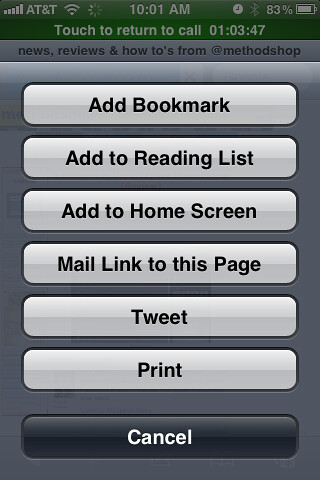
02) Aparecerá una pantalla con un montón de botones que incluyen: Agregar marcador, Agregar a la lista de lectura, Agregar a la pantalla de inicio, Enlace de correo a esta página, Tuitea e imprime. Toca Agregar a la pantalla de inicio botón.
03) Se agregará automáticamente un ícono IPQDF como su imagen de ícono y se le pedirá que escriba un nombre para su marcador.. Sugerimos mantener el nombre breve y atractivo..
04) That’s it! Congrats!
And to have quick access to the International Power Quality Forum Web site directly from your Smart Phone follow these easy steps:
Simply call up the page you’d like to “bookmark” within the Chrome Browser. Within the tool bar area, tap “Settings”. There are 2 options depending on your device. Tap “Bookmarks”. Tap “Add” then tap “OK”. Tap and hold for 2 seconds on the bookmark then tap “Add Shortcut to Home”. The second option would be to tap “Settings” and then “Add to Home Screen” if given that option.
Fuentes:
- http://www.methodshop.com/2012/02/ipad-custom-app-icon.shtml
- http://www.cascobaylines.com/ferry-news/add-web-app-icon-to-your-smartphone-home-screen/